
Everything a commercial property needs, in one app.
Leases, CAM, books, a billing check, tenant letters and portals, with AI that proposes and people who approve.
Find the rent your old system missed.
Each lease against what was billed, month by month, every gap with its dollars and the lease page behind it.
Under-billed
$5,060.86
Over-billed
$705.00
- Missed rent increaseBase rentHarbor Coffee Roasters · Lease p. 3, item 8$652.50
- Free rent ran longBase rentMoonleaf Tea House · Lease p. 2, section 3.2$3,990.00
- True-up not billedCAMNorthside Cleaners · 2024 CAM statement$418.36
- Billed twiceCAM estimateTidewater Nail Studio · Lease p. 6, section 5.3$705.00
- May 2026$4,350.00+$130.50
- Jun 2026$4,350.00+$130.50
- Jul 2026$4,350.00+$130.50
- Aug 2026$4,350.00+$130.50
- Sep 2026$4,350.00+$130.50
Approve what the assistant proposes with one tap.
Charges, credits, work orders and letters proposed here or in ChatGPT, Claude and Grok wait until someone with the right approves.
Post a catch-up charge to Harbor Coffee Roasters
Charge$652.50Proposed by the billing check
- Tenant
- Harbor Coffee Roasters
- Lease
- Harbor Coffee Roasters, Suite C206
- Property
- Wrenfield Commons
- Charge
- Base rent, catch-up
- Months
- May 2026 to September 2026
- Dated
- Nov 5, 2026
- Who may approve
- Owners, admins and accountants
Rent rose 3% on May 1, 2026 (lease p. 3, item 8), and 5 months were billed at the old rent.
- Clear the roof drain above Suite C205Proposed by an AI app (Claude) for Dana WhitfieldNot to exceed$1,800.00Not to exceed$1,800.00
- Insurance certificate request to Tidewater Nail StudioProposed by a notice ruleNotice ruleNotice rule
Approve onWebiPhonesoonAndroidsoon
Tenant letters go out on the right day.
Set each kind of letter to Off, Ask me or Automatic; anything unusual waits for a person, and opt-outs are kept.
- Rent reminder: Automatic
- Late rent notice: Ask me
- Insurance certificate request: Automatic
- Renewal letter: Off
- CAM statement: Ask me
- To
- Harbor Coffee Roasters
- From
- Wrenfield Partners
Your 2025 CAM statement for Suite C206
The statement is attached, with a balance due of $669.39.
CAM statement 2025, C206.pdf- Tidewater Nail StudioInsurance certificate requestSent
- Moonleaf Tea HouseRent reminder, opted outSkipped
- Brightside PharmacyRent reminder, the first one to themWaits
Switch systems with every total checked.
Export the standard reports, and every total is checked against the old system's own before anything is saved.
- Yardi Voyager
- Yardi Breeze
- MRI Commercial Management
- AppFolio
- Rent Manager
- Buildium
- DoorLoop
- Re-Leased
- RealPage
- Entrata
- Propertyware
- Rentvine
- QuickBooks
- Spreadsheets
Layouts checked against real exports
Tie-outs, AppFolioAll tie out
- Monthly rentTies out$28,020.00Rent roll total$28,020.00On 5 leases
Every lease's current rent adds up to the rent roll.
- Open receivablesTies out$6,125.00Aged receivables$6,125.00Open charges$6,125.00Trial balance, receivables
What tenants owe matches the aging and the books.
- Security depositsTies out$45,630.00Deposit report$45,630.00On the leases$45,630.00Trial balance, deposits held
Deposits on the leases match the report and the books.
- Trial balanceTies out$12,843,165.00Debits$12,843,165.00Credits
Debits equal credits.
- Monthly rent$28,020.00Ties out
- Open receivables$6,125.00Ties out
- Security deposits$45,630.00Ties out
- Trial balance$12,843,165.00Ties out
See which loans come due next.
Pins sized by balance, colored by how soon each loan matures.
Stage a vacant suite before you lease it.
AI draws the empty suite leased, labeled as a concept.
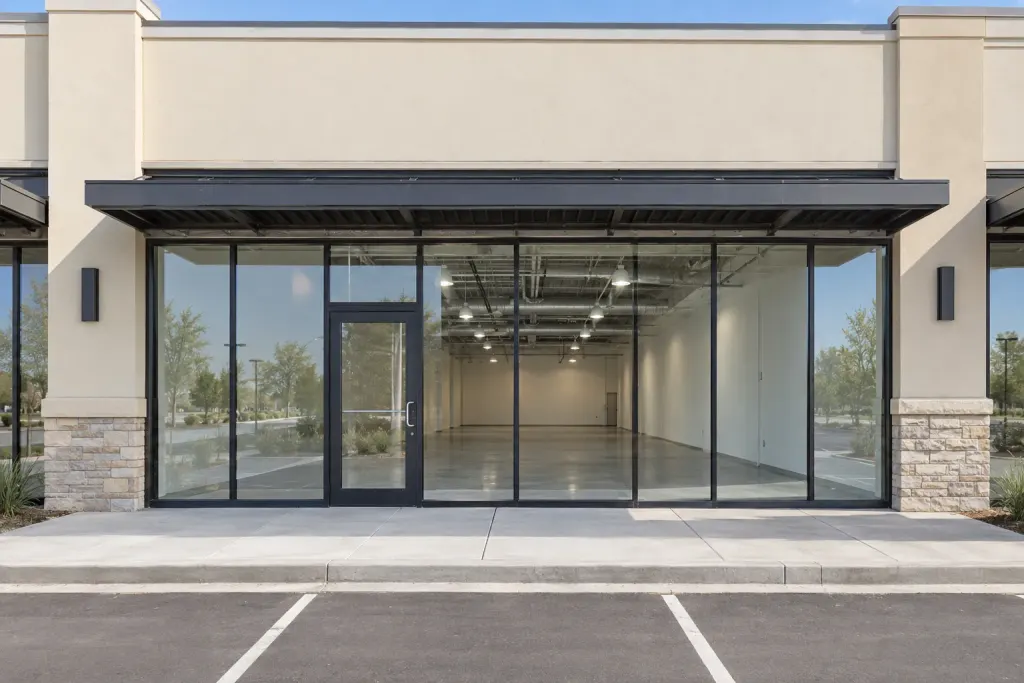 Vacant retail suite
Your whole portfolio in one place.

The Today list
Bills to approve, abstracts to check, late rent and dates coming up.
Owners and entities
LLCs, trusts and people, each with its own books.
Properties and suites
Each suite with its area, tenant and status.
Searchable documents
Preview any file and search its full text.
Search everything
Cmd+K finds a tenant, lease, bill or date.

AI reads the lease, you check it.

AI lease abstracts
Upload a lease or a photo of one and get its terms as a draft to approve.
Cited to the page
Each term quotes the lease, checked against the PDF.
Two readers compared
Two AI models read it; you settle where they differ.
Lease term chart
Terms, options and notice dates, lease by lease.
Critical dates
Notice windows and expirations, with alerts.
Rent roll
Today or as of any date, in Excel or PDF.
Insurance certificates
Tenant certificates tracked to their expiry.
Estoppel requests
Drafted from the lease for a person to send.
CAM reconciled line by line.

Year-end true-up
Pools, shares, caps, gross-up and admin fees down to each tenant's balance.
Recovery terms
Each tenant's share and rules, from the abstract.
Caps and gross-up
Cumulative, compounding and base-year rules.
Lease exclusions
Costs a lease keeps out of the pool.
Checks with evidence
Each cost traced to its invoice and clause.
Monthly estimates
Estimates set for the year and billed each month.
Tenant statements
PDF statements with their backup package.
Tenant-side audit
Check a landlord's statement against the lease.
Books and statements that balance.

Double-entry books
Per entity and per property, on a commercial chart of accounts.
Tenant ledgers
Charges from the leases, receipts, late fees and aging.
Bills from photos
AI reads the invoice; you approve the bill.
Bank reconciliation
Import bank files and match them to the ledger.
Owner statements
Statements with distributions for each owner.
Financial reports
P&L, balance sheet, cash flow and trial balance.
Close the month
Lock a period so it stays the way you closed it.
Online rent paymentsComing soon
Tenants will pay by bank debit from the portal.
Bill what the lease says, month by month.

Billing check
Each lease against what was billed, with the dollars and the page.
Missed rent steps
Increases never billed, free rent that ran long, holdover rent.
CAM, tax and insurance
Estimates billed at the wrong amount, true-ups never billed.
Catch-ups and credits
Proposed for one tap; nothing posts until someone approves.
Runs every month
On its own after the month's charges post, with a PDF and CSV.
Budgets, forecasts and every loan.

Loans on a map
Each property's next maturity, sized by balance.
Annual budgets
By property, account and month, against actuals.
Forecast range
Five and ten years, with the range drawn.
Three scenarios
Base, downside and upside, from the leases.
Loan watch
Coverage, maturity warnings and the refinance gap.
Work orders and the paperwork.

Work orders
From a tenant's request to the vendor's bill, with photos.
Preventive maintenance
Recurring visits that become work orders ahead of time.
Site inspections
Checklists with photos for each visit.
Vendor compliance
W-9s and insurance certificates on file.
One calendar
Every key date, with an iCal feed and an email digest.
Tenant letters go out on the right day.

Tenant notices
Rent reminders, late rent, insurance, renewals and CAM statements.
Off, Ask me, Automatic
Choose for each kind of letter, property by property.
Unusual letters wait
A first letter, a dispute or a changed amount waits for a person.
Statements attached
CAM statements go out with the PDF and are marked sent.
Opt-outs and a record
Tenants can opt out; each letter is kept with why it went or not.
Lease up the vacant suites.

AI staging
A vacant suite drawn as a cafe, office or showroom, labeled as a concept.
Vacant suites
Each vacant suite with its asking rent and a one-page flyer.
Prospect pipeline
From the first call to a tour, a proposal and the LOI.
LOIs and deals
The terms you're negotiating, suite by suite.
Renewal tracking
Who is talking, who agreed and who is leaving.

Portals for tenants and owner clients.

Tenant portal
Balance, statements, CAM backup, repair requests and insurance uploads.
Owner portal
Statements, reports, budgets and documents.
Move in from any system or spreadsheet.

Migration center
12 property systems, QuickBooks and spreadsheets, from their standard reports.
Totals tied out
Rent, receivables, deposits and the trial balance, checked first.
One-step undo
Undo the whole move if something isn't right.
Billing history too
The old system's billing comes along for the billing check.
QuickBooks files
Desktop and Online exports, IIF included.
Any spreadsheet
AI maps the columns; you check the preview.
PDFs and photos
Leases to abstracts, invoices to bills.
Bank files
OFX, QFX and CSV.
Approve each proposal with one tap.

Proposed actions
Charges, credits, work orders and letters wait for one tap.
Every detail shown
The amount, the months, who proposed it and from where.
From your AI app
ChatGPT, Claude and Grok can propose; approval stays in the app.
Only with the right
Only someone who may post or send can approve it.
Checked at the tap
If the records changed since you looked, nothing happens.
Ask a question, get the record.

ChatGPT, Claude, Grok
Connect your portfolio to the AI app you use, signed in as you.
Built-in assistant
Answers link to their records; what it proposes waits for you.
The same records on your phone.

iPhone app
Coming to the App Store: Today, approvals, leases and camera scans.
Installable web app
Adds to the home screen of any phone.


Private, encrypted and backed up.

Only your company
Each organization sees its own records and nothing else.
Encrypted throughout
On the way to us and where we store it.
Backups in two regions
Daily and monthly, in the United States.
Two-step sign-in
A code from your authenticator app.
Roles and access
Owners, staff and portal users see what they need.
Audit trail
Every change, with who made it and when.
Export anytime
Download the whole organization.
No AI training
AI providers will not train on your data.


Set up your first property.
Owner and Owner Plus start with 14 days free, without a card. Bring a rent roll, QuickBooks files or lease PDFs, and you can set up your portfolio in about ten minutes. For a large portfolio, or if you want our team to move you in, ask about Enterprise.
The buildings, businesses, people and figures in the examples on this page are made up.